Despite the ongoing Canada Post Labor disputes, Canada Post now has Unlocked wireless devices from your standard wireless cell phones to the latest Smartphone's on sale via the Canada Post website. Check out the great deals, specifically the iPhone SALE that is on right now. Canada Post is featuring a wide variety of Smartphones including the Samsung SGH-T959 Vibrant to the BlackBerry Bold 9780 and including the amazing and ever popular iPhone 4!! If you are in the market for an unlocked device that can be used on any network, you don't want to miss out on this.
If you do not know what is meant by an unlocked device read on:
An unlocked cell phone is a cellular telephone handset or smartphone that can be used with more than one service provider, making it easy for a user to switch from one cellular network to another.
The sequence of steps a user must perform in order to unlock a cell phone depends on the original communications service provider and on the manufacturer of the phone set. Some cell phone sets can be unlocked by inputting codes to modify the software in the unit. Other sets require the purchase of special cables or modification of the internal hardware as well as reprogramming of the phone's data settings. In the wake of the U.S. Copyright Office's decision in November 2006 to allow cell-phone unlocking for at least three years thereafter, numerous companies began to offer unlocking services for a fee.
Proponents of cell-phone unlocking argue that consumers should be free to change their network when a subscription contract expires without having to discard hardware they purchased outright. Some cell-phone service providers, unhappy with the Copyright Office's decision, are resisting the practice by making their cell-phone sets difficult or impossible to unlock.
For more information on unlocking your own device, contact your wireless service provider or Google it!!

Showing posts with label unlock. Show all posts
Showing posts with label unlock. Show all posts
Thursday, June 23, 2011


Thursday, January 20, 2011
Ultra-recycle
From The iPhone Dev Team....some time ago....
Today we’re pleased to announce our free carrier unlock for iPhone3G/3GS owners with a baseband later than 05.13.04. The unlock for that baseband exploited the AT+XAPP command, thanks to a crash initially discovered by @sherif_hashim (@Oranav also found this crash). So what hole are we exploiting today, since Apple closed that AT+XAPP hole? Well, we’re exploiting the exact same hole!
It turns out that the very first iPad firmware 3.2.2 has baseband version 06.15.00 still vulnerable to AT+XAPP. The iPad baseband is built for the exact same baseband chip as the iPhone3G/3GS — they’re fully compatible! Some of us have been running 06.15 for weeks now on our iPhones in preparation for this release. (And some have known about this possibility of 06.15 on the iPhones for a while — kudos to @w1kedZ and @DHowett for keeping it hush!)
Unlockers have been reporting mixed results about GPS functionality at 06.15.00. Until we can track down what differentiates those who retain GPS vs. those who lose it, be conservative and assume you’ll lose GPS at 06.15.00. As we work on finding the cause (and possibly a fix), please report your personal findings in our comments section. (Update: early indications are that while 06.15.00 is capable of GPS, it will require some further hacks. But please still be conservative and assume you will lose GPS at 06.15, in case the hacks don’t work).
SIMPLIFIED ROUTE #1 (redsn0w for OSX + Windows):
1. Read and fully understand the warning below.
2. If you have an old-bootrom 3GS and are already unlockable but want to get to 4.2.1, please wait til we release an “unofficial” bundle for you. Read no further.
3. Use redsn0w (see update #2) for OSX or Windows. Enable the “Install iPad baseband” option and accept the warning.
4. When the redsn0w ramdisk is finished, install ultrasn0w via Cydia.
5. Enjoy!
SIMPLIFIED ROUTE #2 (PwnageTool for OSX):
1. Read and fully understand the warning below.
2. If you have an old-bootrom 3GS and are already unlockable but want to get to 4.2.1, please wait til we release an “unofficial” bundle for you. Read no further.
3. Read update #1 for an updated 3GS bundle.
4. Download this IPSW
5. Run PwnageTool to create a custom 4.1 IPSW. Tell it you want to use the iPad baseband you just downloaded. Restore to this custom IPSW.
6. Install ultrasn0w through Cydia
7. Enjoy!
FULL VERSION:
Since 06.15 is a higher version than 05.14 or 05.15 (where AT+XAPP is gone), anyone stuck at those versions can simply upgrade to 06.15 to unlock again! Luckily for us, Apple *still* provides the iPad FW 3.2.2 with this vulnerable baseband right from their own servers. (Grab it now, before they take it down!)
We’ve been busy updating both PwnageTool and redsn0w to make the baseband update as seamless as possible.
1. First up is “PwnageTool 4.1.3 Unlock Edition”. It has a special dialog box which will ask you if you want to update to the iPad baseband. You must already have the iPad 3.2.2 IPSW on your computer (see the above link)….so just point PwnageTool at it (or let it find it on its own if you’re in “simple” mode).
2. Directly after PwnageTool 4.1.3 is available, the official ultrasn0w repo http://repo666.ultrasn0w.com will be updated with ultrasn0w 1.2, which covers iPhone 4 baseband 01.59.00 and iPhone 3G/3GS basebands 04.26.08, 05.11.07, 05.12.01, 05.13.04 and now 06.15.00.
3. Finally, we’ll release an update to redsn0w today for those without Macs and can’t run PwnageTool. The new redsn0w will give you the option to update your baseband to 06.15 too.
1. There is no way to come back down from 06.15, and there’s no hiding the baseband version from Apple. You’ll be voiding your warranty in a very obvious way.
2. If some future baseband comes out with a critical fix, you won’t be able to update to it if it remains down in the 05.xx sequence (then again, you wouldn’t update to it if you wanted to keep your unlock anyway).
3. Starting with FW 4.2.1 if you have 06.15 on your iPhone you won’t ever be able to restore to stock firmware (it will fail). You’ll need to only restore to custom IPSWs (then again, if you’re unlocker you should already be doing that).
Unlockers have been reporting mixed results about GPS functionality at 06.15.00. Until we can track down what differentiates those who retain GPS vs. those who lose it, be conservative and assume you’ll lose GPS at 06.15.00. As we work on finding the cause (and possibly a fix), please report your personal findings in our comments section. (Update: early indications are that while 06.15.00 is capable of GPS, it will require some further hacks. But please still be conservative and assume you will lose GPS at 06.15, in case the hacks don’t work).
Certainly don’t update to 06.15 if you don’t need to! Only do this if you need the unlock and you’re stuck on 05.14 or 05.15, and you’re willing to assume the above risks.
This PwnageTool also contains a 4.2.1 bundle for iPhone3G owners…for all else, it’s still only 4.1. If you have an iPhone3GS with an old bootrom, use redsn0w for an untethered 4.2.1 jailbreak (it can now install the iPad baseband too). For all other devices, the 4.2.1 jailbreak is tethered only (use redsn0w for it), until @comex can work some untethering magic.
Please feel free to use our comments section for questions. We have some very knowledgeable and helpful moderators: angiepangie, Confucious, sherif_hashim, dhlizard, and Frank55!
Official Bittorrent Releases
PwnageTool 4.1.3 - PwnageTool_4.1.3_Unlock_Edition.dmg.5994102.TPB.torrent
SHA1 Sum = adda6d882dce1b5117d01586037de289407e038a
Unofficial Mirrors
The following links are unofficial download mirrors, you download these archives at your own risk, we accept no responsibility if your computer explodes or if it becomes part of a NASA attacking botnet or even worse if your hands fall off mid-way during the use of these files. We do not check these links and we accept no responsibility with regard to the validity of the files, the other content that these links may provide or with the content that is on the third-party linked site.
Always check the files that you have downloaded against our published SHA1 hash.
We would prefer that you downloaded the official bittorrent release that is linked above, but you are welcome to try these if you really must.
http://8sv.de/dl/iphone/PwnageTool_4.1.3_Unlock_Edition.dmg
http://gumballtech.com/files/PwnageTool_4.1.3_Unlock_Edition.dmg
http://myblack.co.cc/PwnageTool_4.1.3_Unlock_Edition.dmg
http://cloud.xtra.me.uk/dev/PwnageTool_4.1.3_Unlock_Edition.dmg
http://xtra.me.uk/dev/PwnageTool_4.1.3_Unlock_Edition.dmg
http://www.zaone.ro/PwnageTool_4.1.3_Unlock_Edition.dmg
http://www.emreunal.com/PwnageTool_4.1.3_Unlock_Edition.dmg
http://www.cofo.us/idevice/PwnageTool_4.1.3_Unlock_Edition.dmg
http://ibloo.net/PwnageTool_4.1.3_Unlock_Edition.dmg
http://jacensolo.com/PwnageTool_4.1.3_Unlock_Edition.dmg
http://theplacefordee.com/PwnageTool_4.1.3_Unlock_Edition.dmg
http://loloke.hu/PwnageTool_4.1.3_Unlock_Edition.dmg
http://powerfree.pl/iphone/PwnageTool_4.1.3_Unlock_Edition.dmg
http://www.accesoriigsm.net/tools/PwnageTool_4.1.3_Unlock_Edition.dmg
http://cdn.nspwn.com/PwnageTool_4.1.3_Unlock_Edition.dmg
http://msby.org/iphone_dev/PwnageTool_4.1.3_Unlock_Edition.dmg
http://www.tomreinartz.com/DevTeam/PwnageTool_4.1.3_Unlock_Edition.dmg
http://iNeal.ME/up/pt413.dmg
Mirror owners should email direct dmg download links only (no rapidshare type sites please) to blog@iphone-dev.org — please don’t place mirrors in the comments as they will be deleted.
Update #1: There’s an error in the bundle for the iPhone3GS 4.1 that prevents the new baseband from being used. If you know your way around OSX, please download the fixed bundle, and unzip it if Safari hasn’t already done so. Then “Show Package Contents” of PwnageTool.app, navigate to Contents->Resources->FirmwareBundles and drop it there. Otherwise, please wait for the updated PwnageTool, or the OSX version of redsn0w coming soon.
Update #2: The new redsn0w 0.9.6beta5 is out. It gives both Windows and OSX users the ability to flash the iPad 06.15 baseband on iPhone3G or iPhone3GS. It fetches the baseband files directly from Apple for now (the only IPSW you ever point it at is the stock IPSW for the FW on your iPhone right now). There may be a long delay while it’s doing this (their servers are currently getting pounded).
If you do flash your baseband via redsn0w, please keep it plugged into USB the whole time. You don’t want your battery to die during the flash process!
Update #3: For those Mac users with an old-bootrom 3GS who really know what they’re doing, here’s a minimal 3GS 4.2.1 bundle that will get you to 4.2.1 without updating your baseband. Be sure to uncheck “Activate the iPhone” using Expert mode. To actually jailbreak after you’ve restored with the help of that bundle, please use redsn0w. If you don’t know how to drop a bundle into PwnageTool.app, please hold off on 4.2.1 until it’s untethered for everyone (or wait for a nice tutorial from somewhere like http://iclarified.com)
Update #4: Our terrific moderators angiepangie, Confucious, sherif_hashim, dhlizard, and Frank55 have done a stupendous job moderating 7700 comments over just the first 12 hours (that’s 10 per minute for half a day!). Hats off to them, and to all of our great commenters who rack up those + points for helping total strangers jailbreak and unlock their iPhones! That’s what makes this community great :)
Update #5: Unlockers have been reporting mixed results about GPS functionality at 06.15.00. Until we can track down what differentiates those who retain GPS vs. those who lose it, be conservative and assume you’ll lose GPS at 06.15.00. As we work on finding the cause (and possibly a fix), please report your personal findings in our comments section. (Update: early indications are that while 06.15.00 is capable of GPS, it will require some further hacks. But please still be conservative and assume you will lose GPS at 06.15, in case the hacks don’t work).
Update #6: Developer @sbingner (author of TetherMe) has made some excellent progress devising a new hactivation method that kills two birds with one stone for all you ultrasn0w unlockers. His tool, “Subscriber Artificial Module (SAM)” tricks your iPhone and iTunes into creating legitimate activation tickets even though you’re unlocked with ultrasn0w. This means you get the full benefit of push applications, and your battery life increases substantially. If you’d like to try it out, check out http://www.bingner.com/SAM.html
To help make it easier to try out @sbingner’s tool, we’ve updated redsn0w to include a new “Deactivate” option for the 3G and 3GS. Use this option *after* you’ve installed SAM…it will remove the normal patches made to lockdownd and let SAM take over. (sbingner plans on making a button to do this within SAMPrefs too). Great work, @sbingner!
The new redsn0w with the “Deactivate” option is at:
* OSX
* Windows (Windows 7 and Vista users, please run redsn0w as Administrator in “XP Compatiblity Mode”)
Today we’re pleased to announce our free carrier unlock for iPhone3G/3GS owners with a baseband later than 05.13.04. The unlock for that baseband exploited the AT+XAPP command, thanks to a crash initially discovered by @sherif_hashim (@Oranav also found this crash). So what hole are we exploiting today, since Apple closed that AT+XAPP hole? Well, we’re exploiting the exact same hole!
It turns out that the very first iPad firmware 3.2.2 has baseband version 06.15.00 still vulnerable to AT+XAPP. The iPad baseband is built for the exact same baseband chip as the iPhone3G/3GS — they’re fully compatible! Some of us have been running 06.15 for weeks now on our iPhones in preparation for this release. (And some have known about this possibility of 06.15 on the iPhones for a while — kudos to @w1kedZ and @DHowett for keeping it hush!)
Unlockers have been reporting mixed results about GPS functionality at 06.15.00. Until we can track down what differentiates those who retain GPS vs. those who lose it, be conservative and assume you’ll lose GPS at 06.15.00. As we work on finding the cause (and possibly a fix), please report your personal findings in our comments section. (Update: early indications are that while 06.15.00 is capable of GPS, it will require some further hacks. But please still be conservative and assume you will lose GPS at 06.15, in case the hacks don’t work).
SIMPLIFIED ROUTE #1 (redsn0w for OSX + Windows):
1. Read and fully understand the warning below.
2. If you have an old-bootrom 3GS and are already unlockable but want to get to 4.2.1, please wait til we release an “unofficial” bundle for you. Read no further.
3. Use redsn0w (see update #2) for OSX or Windows. Enable the “Install iPad baseband” option and accept the warning.
4. When the redsn0w ramdisk is finished, install ultrasn0w via Cydia.
5. Enjoy!
SIMPLIFIED ROUTE #2 (PwnageTool for OSX):
1. Read and fully understand the warning below.
2. If you have an old-bootrom 3GS and are already unlockable but want to get to 4.2.1, please wait til we release an “unofficial” bundle for you. Read no further.
3. Read update #1 for an updated 3GS bundle.
4. Download this IPSW
5. Run PwnageTool to create a custom 4.1 IPSW. Tell it you want to use the iPad baseband you just downloaded. Restore to this custom IPSW.
6. Install ultrasn0w through Cydia
7. Enjoy!
FULL VERSION:
Since 06.15 is a higher version than 05.14 or 05.15 (where AT+XAPP is gone), anyone stuck at those versions can simply upgrade to 06.15 to unlock again! Luckily for us, Apple *still* provides the iPad FW 3.2.2 with this vulnerable baseband right from their own servers. (Grab it now, before they take it down!)
We’ve been busy updating both PwnageTool and redsn0w to make the baseband update as seamless as possible.
1. First up is “PwnageTool 4.1.3 Unlock Edition”. It has a special dialog box which will ask you if you want to update to the iPad baseband. You must already have the iPad 3.2.2 IPSW on your computer (see the above link)….so just point PwnageTool at it (or let it find it on its own if you’re in “simple” mode).
2. Directly after PwnageTool 4.1.3 is available, the official ultrasn0w repo http://repo666.ultrasn0w.com will be updated with ultrasn0w 1.2, which covers iPhone 4 baseband 01.59.00 and iPhone 3G/3GS basebands 04.26.08, 05.11.07, 05.12.01, 05.13.04 and now 06.15.00.
3. Finally, we’ll release an update to redsn0w today for those without Macs and can’t run PwnageTool. The new redsn0w will give you the option to update your baseband to 06.15 too.
1. There is no way to come back down from 06.15, and there’s no hiding the baseband version from Apple. You’ll be voiding your warranty in a very obvious way.
2. If some future baseband comes out with a critical fix, you won’t be able to update to it if it remains down in the 05.xx sequence (then again, you wouldn’t update to it if you wanted to keep your unlock anyway).
3. Starting with FW 4.2.1 if you have 06.15 on your iPhone you won’t ever be able to restore to stock firmware (it will fail). You’ll need to only restore to custom IPSWs (then again, if you’re unlocker you should already be doing that).
Unlockers have been reporting mixed results about GPS functionality at 06.15.00. Until we can track down what differentiates those who retain GPS vs. those who lose it, be conservative and assume you’ll lose GPS at 06.15.00. As we work on finding the cause (and possibly a fix), please report your personal findings in our comments section. (Update: early indications are that while 06.15.00 is capable of GPS, it will require some further hacks. But please still be conservative and assume you will lose GPS at 06.15, in case the hacks don’t work).
Certainly don’t update to 06.15 if you don’t need to! Only do this if you need the unlock and you’re stuck on 05.14 or 05.15, and you’re willing to assume the above risks.
This PwnageTool also contains a 4.2.1 bundle for iPhone3G owners…for all else, it’s still only 4.1. If you have an iPhone3GS with an old bootrom, use redsn0w for an untethered 4.2.1 jailbreak (it can now install the iPad baseband too). For all other devices, the 4.2.1 jailbreak is tethered only (use redsn0w for it), until @comex can work some untethering magic.
Please feel free to use our comments section for questions. We have some very knowledgeable and helpful moderators: angiepangie, Confucious, sherif_hashim, dhlizard, and Frank55!
Official Bittorrent Releases
PwnageTool 4.1.3 - PwnageTool_4.1.3_Unlock_Edition.dmg.5994102.TPB.torrent
SHA1 Sum = adda6d882dce1b5117d01586037de289407e038a
Unofficial Mirrors
The following links are unofficial download mirrors, you download these archives at your own risk, we accept no responsibility if your computer explodes or if it becomes part of a NASA attacking botnet or even worse if your hands fall off mid-way during the use of these files. We do not check these links and we accept no responsibility with regard to the validity of the files, the other content that these links may provide or with the content that is on the third-party linked site.
Always check the files that you have downloaded against our published SHA1 hash.
We would prefer that you downloaded the official bittorrent release that is linked above, but you are welcome to try these if you really must.
http://8sv.de/dl/iphone/PwnageTool_4.1.3_Unlock_Edition.dmg
Mirror owners should email direct dmg download links only (no rapidshare type sites please) to blog@iphone-dev.org — please don’t place mirrors in the comments as they will be deleted.
Update #1: There’s an error in the bundle for the iPhone3GS 4.1 that prevents the new baseband from being used. If you know your way around OSX, please download the fixed bundle, and unzip it if Safari hasn’t already done so. Then “Show Package Contents” of PwnageTool.app, navigate to Contents->Resources->FirmwareBundles and drop it there. Otherwise, please wait for the updated PwnageTool, or the OSX version of redsn0w coming soon.
Update #2: The new redsn0w 0.9.6beta5 is out. It gives both Windows and OSX users the ability to flash the iPad 06.15 baseband on iPhone3G or iPhone3GS. It fetches the baseband files directly from Apple for now (the only IPSW you ever point it at is the stock IPSW for the FW on your iPhone right now). There may be a long delay while it’s doing this (their servers are currently getting pounded).
If you do flash your baseband via redsn0w, please keep it plugged into USB the whole time. You don’t want your battery to die during the flash process!
Update #3: For those Mac users with an old-bootrom 3GS who really know what they’re doing, here’s a minimal 3GS 4.2.1 bundle that will get you to 4.2.1 without updating your baseband. Be sure to uncheck “Activate the iPhone” using Expert mode. To actually jailbreak after you’ve restored with the help of that bundle, please use redsn0w. If you don’t know how to drop a bundle into PwnageTool.app, please hold off on 4.2.1 until it’s untethered for everyone (or wait for a nice tutorial from somewhere like http://iclarified.com)
Update #4: Our terrific moderators angiepangie, Confucious, sherif_hashim, dhlizard, and Frank55 have done a stupendous job moderating 7700 comments over just the first 12 hours (that’s 10 per minute for half a day!). Hats off to them, and to all of our great commenters who rack up those + points for helping total strangers jailbreak and unlock their iPhones! That’s what makes this community great :)
Update #5: Unlockers have been reporting mixed results about GPS functionality at 06.15.00. Until we can track down what differentiates those who retain GPS vs. those who lose it, be conservative and assume you’ll lose GPS at 06.15.00. As we work on finding the cause (and possibly a fix), please report your personal findings in our comments section. (Update: early indications are that while 06.15.00 is capable of GPS, it will require some further hacks. But please still be conservative and assume you will lose GPS at 06.15, in case the hacks don’t work).
Update #6: Developer @sbingner (author of TetherMe) has made some excellent progress devising a new hactivation method that kills two birds with one stone for all you ultrasn0w unlockers. His tool, “Subscriber Artificial Module (SAM)” tricks your iPhone and iTunes into creating legitimate activation tickets even though you’re unlocked with ultrasn0w. This means you get the full benefit of push applications, and your battery life increases substantially. If you’d like to try it out, check out http://www.bingner.com/SAM.html
To help make it easier to try out @sbingner’s tool, we’ve updated redsn0w to include a new “Deactivate” option for the 3G and 3GS. Use this option *after* you’ve installed SAM…it will remove the normal patches made to lockdownd and let SAM take over. (sbingner plans on making a button to do this within SAMPrefs too). Great work, @sbingner!
The new redsn0w with the “Deactivate” option is at:
* OSX
* Windows (Windows 7 and Vista users, please run redsn0w as Administrator in “XP Compatiblity Mode”)
Wednesday, August 4, 2010
Unlock with Ultrasn0w: A Step by Step
Need to unlock your iPhone? Here is an easy step by step tutorial.
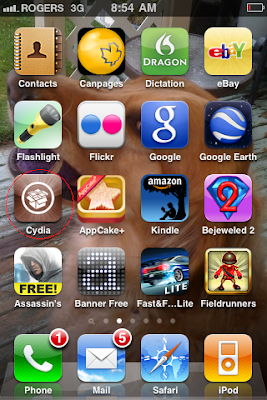
1st, your iPhone must be Jailbroken with Cydia installed. Launch Cydia as seen below:
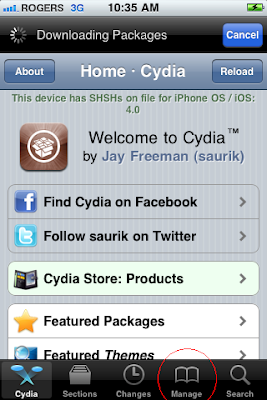
Allow Cydia to load and update. This may take several minutes. If there is an indicator on the "changes" tab at the bottom, install all changes before continuing.
Now click on Manage at the bottom:
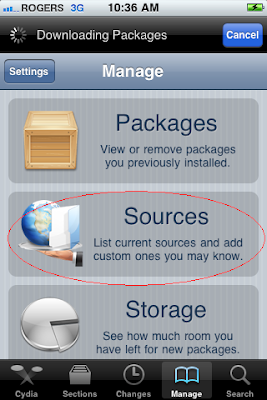
Now click on "Sources"
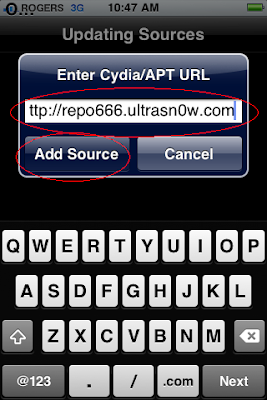
Now you need to add the ultrasn0w repository by clicking on "Edit" and enter http://repo666.ultrasn0w.com as seen below and hit "Add Source"
Verify the Ultrasn0w Repo is added and now click "Search"
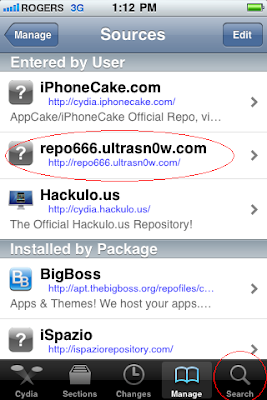
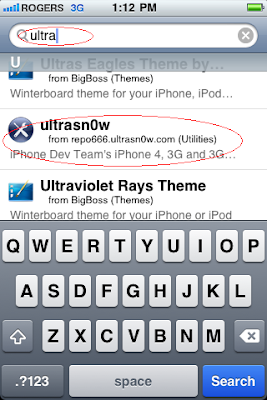
Select "Ultrasn0w" from the results list:
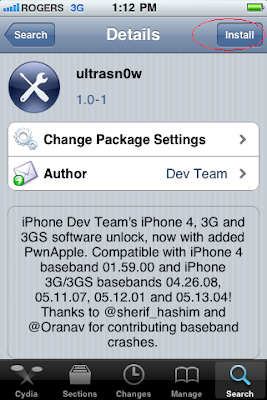
Select "Install"
And now "Confirm"
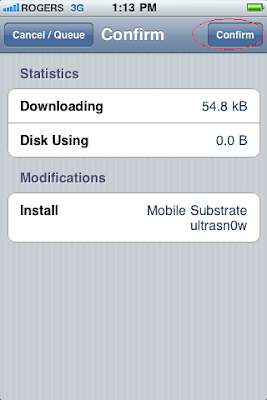
This process will take a few minutes and you will be asked to reboot your device. Once booted up, you are unlocked and can test this by entering another carriers SIM to the iPhone!!
1st, your iPhone must be Jailbroken with Cydia installed. Launch Cydia as seen below:

Allow Cydia to load and update. This may take several minutes. If there is an indicator on the "changes" tab at the bottom, install all changes before continuing.
Now click on Manage at the bottom:

Now click on "Sources"

Now you need to add the ultrasn0w repository by clicking on "Edit" and enter http://repo666.ultrasn0w.com as seen below and hit "Add Source"

Verify the Ultrasn0w Repo is added and now click "Search"

Select "Ultrasn0w" from the results list:

Select "Install"

And now "Confirm"

This process will take a few minutes and you will be asked to reboot your device. Once booted up, you are unlocked and can test this by entering another carriers SIM to the iPhone!!
Monday, November 16, 2009
blackra1n
blackra1n is an unlock / jailbreaking tool for Mac and PC users alike. This is not a dev-team release but some users are reporting success with this new tool. For more information about blackra1n the link has been added in the trusted link section on the right, or you can follow the links below:
Click here for PC users
Click here for MAC users

Use Bonus Code: TGiPJB for 100% up to $100 on 1st Deposit
Click here for MAC users

Use Bonus Code: TGiPJB for 100% up to $100 on 1st Deposit
Tuesday, February 3, 2009
Unlock vs. Jailbreak
I've come upon a lot of posts on a lot of different sites asking about "unlocking" and "jailbreaking" and a lot of people are confusing the two terms. So here is a brief explanation that should clear things up.
Unlocking your iPhone is done so that you may use any SIM Card from any service provider on a GSM network, truly making it a world phone. iPhones typically are "locked" to a specific network by the service provider you buy your iPhone from. To unlock your iPhone, the iPhone Dev-Team have a program called "Yellowsn0w" To find info on this and instructions on how to unlock go here: http://yellowsn0w.com/
Jailbreaking your iPhone frees it so that 3rd party apps, games, themes etc... can be used on your iPhone. This will allow personal customization and use outside of the restrictions Apple has put in place. Thus, an iPhone "Jailbreak". Instructions on how to Jailbreak are posted in the Blog Archive under "How to Jailbreak your iPhone 3G 2.2" posted on Tuesday, January 27, 2009. If you have Firmware 2.2.1 then go to the post in the Blog Archive under "**UPDATE** 2.2.1 Firmware Jailbreak" posted on Friday, January 30, 2009.
Hope that clears up the confusion!
Stay iTuned for more to come!

Unlocking your iPhone is done so that you may use any SIM Card from any service provider on a GSM network, truly making it a world phone. iPhones typically are "locked" to a specific network by the service provider you buy your iPhone from. To unlock your iPhone, the iPhone Dev-Team have a program called "Yellowsn0w" To find info on this and instructions on how to unlock go here: http://yellowsn0w.com/
Jailbreaking your iPhone frees it so that 3rd party apps, games, themes etc... can be used on your iPhone. This will allow personal customization and use outside of the restrictions Apple has put in place. Thus, an iPhone "Jailbreak". Instructions on how to Jailbreak are posted in the Blog Archive under "How to Jailbreak your iPhone 3G 2.2" posted on Tuesday, January 27, 2009. If you have Firmware 2.2.1 then go to the post in the Blog Archive under "**UPDATE** 2.2.1 Firmware Jailbreak" posted on Friday, January 30, 2009.
Hope that clears up the confusion!
Stay iTuned for more to come!
Subscribe to:
Posts (Atom)