
Thursday, August 12, 2010


Wednesday, August 11, 2010
Wednesday, August 4, 2010
Unlock with Ultrasn0w: A Step by Step
Need to unlock your iPhone? Here is an easy step by step tutorial.
1st, your iPhone must be Jailbroken with Cydia installed. Launch Cydia as seen below:
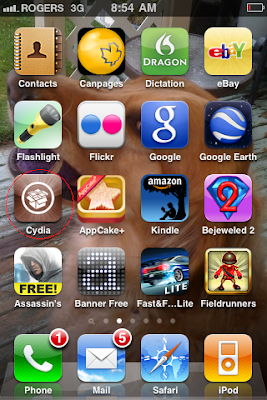
Allow Cydia to load and update. This may take several minutes. If there is an indicator on the "changes" tab at the bottom, install all changes before continuing.
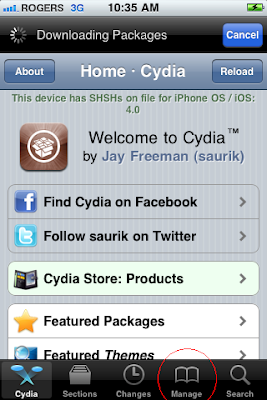
Now click on Manage at the bottom:
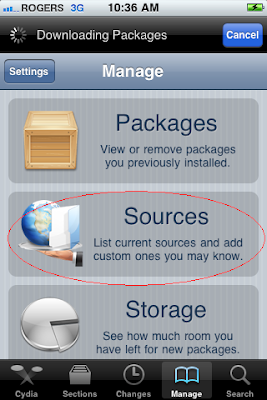
Now click on "Sources"
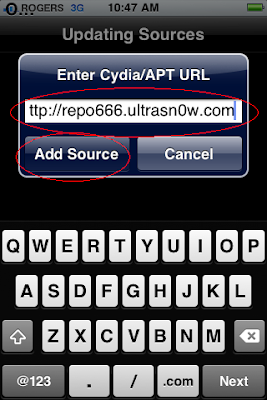
Now you need to add the ultrasn0w repository by clicking on "Edit" and enter http://repo666.ultrasn0w.com as seen below and hit "Add Source"
Verify the Ultrasn0w Repo is added and now click "Search"
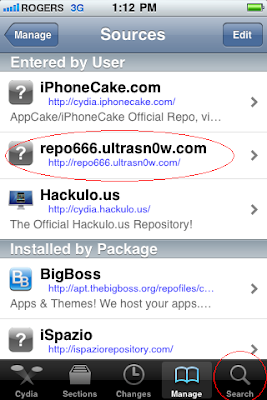
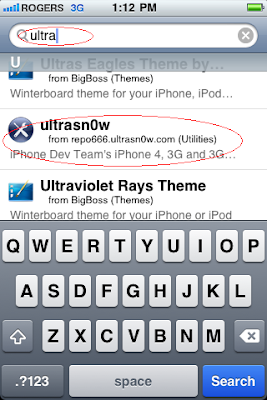
Select "Ultrasn0w" from the results list:
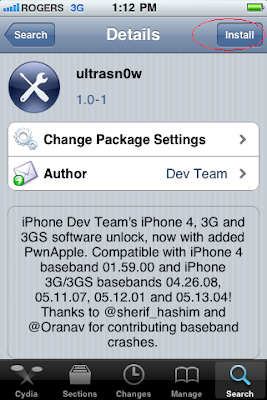
Select "Install"
And now "Confirm"
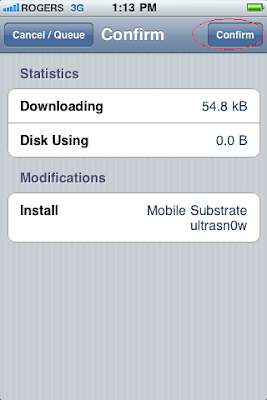
This process will take a few minutes and you will be asked to reboot your device. Once booted up, you are unlocked and can test this by entering another carriers SIM to the iPhone!!
1st, your iPhone must be Jailbroken with Cydia installed. Launch Cydia as seen below:

Allow Cydia to load and update. This may take several minutes. If there is an indicator on the "changes" tab at the bottom, install all changes before continuing.
Now click on Manage at the bottom:

Now click on "Sources"

Now you need to add the ultrasn0w repository by clicking on "Edit" and enter http://repo666.ultrasn0w.com as seen below and hit "Add Source"

Verify the Ultrasn0w Repo is added and now click "Search"

Select "Ultrasn0w" from the results list:

Select "Install"

And now "Confirm"

This process will take a few minutes and you will be asked to reboot your device. Once booted up, you are unlocked and can test this by entering another carriers SIM to the iPhone!!
Monday, August 2, 2010
The return of jailbreakme.com!
From the iPhone Dev-Team:
jailbreakme.com is back!
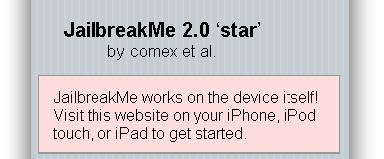
Thanks to some serious work by @comex, you can now jailbreak your iPhone, iPod Touch, or iPad right from MobileSafari — no PC or Mac needed!
Just visit http://jailbreakme.com on your device.
For those needing a carrier unlock, use the existing ultrasn0w in Cydia on your iPhone3G or iPhone3GS. After a short testing period, we’ll push out the iPhone4 version.
Note: The earlier MMS and Facetime issues have been fixed. If you already ran the version with those problems, launch Cydia and accept its offer to update.
jailbreakme.com is back!
Thanks to some serious work by @comex, you can now jailbreak your iPhone, iPod Touch, or iPad right from MobileSafari — no PC or Mac needed!
Just visit http://jailbreakme.com on your device.

For those needing a carrier unlock, use the existing ultrasn0w in Cydia on your iPhone3G or iPhone3GS. After a short testing period, we’ll push out the iPhone4 version.
Note: The earlier MMS and Facetime issues have been fixed. If you already ran the version with those problems, launch Cydia and accept its offer to update.
Wednesday, July 28, 2010
iPhone 4 to be released in Canada July 30th
The iPhone 4 is to be released for Rogers customers as per www.rogers.com

Customers are being asked to refrain from calling Rogers Customer Care for inventory updates as stock levels are anticipated to drop quickly and Rogers Care representatives will not have updated information on iPhone 4 inventory levels. Customers are instead asked to do the following:
1. Check www.Rogers.com: If there are iPhones available, customers may purchase it online.
2. Customers are to call or visit a Rogers Retail stores to see if they have any devices in stock. Customers can find the closest store location by going to http://rogers.com/storelocator/. The store will advise the customer of the current availability, and/or when they will receive a new shipment.
3. Customers can call Customer Care (1-888-ROGERS-1) and will be provided availability updates through the automated menu (IVR). The customer should hang up after they receive the availability information and not to call into Rogers Care, because Care reps will be unable to provide any additional information.
4. Customers can sign up on http://rogers.com/iPhone/ to receive e-mails from Rogers notifying them of any inventory updates.

Customers are being asked to refrain from calling Rogers Customer Care for inventory updates as stock levels are anticipated to drop quickly and Rogers Care representatives will not have updated information on iPhone 4 inventory levels. Customers are instead asked to do the following:
1. Check www.Rogers.com: If there are iPhones available, customers may purchase it online.
2. Customers are to call or visit a Rogers Retail stores to see if they have any devices in stock. Customers can find the closest store location by going to http://rogers.com/storelocator/. The store will advise the customer of the current availability, and/or when they will receive a new shipment.
3. Customers can call Customer Care (1-888-ROGERS-1) and will be provided availability updates through the automated menu (IVR). The customer should hang up after they receive the availability information and not to call into Rogers Care, because Care reps will be unable to provide any additional information.
4. Customers can sign up on http://rogers.com/iPhone/ to receive e-mails from Rogers notifying them of any inventory updates.
Tuesday, July 27, 2010
U.S. Government: iPhone Jailbreaking Is Fair Use
From www.pcworld.com
The United States Government, at the request of the Electronic Frontier Foundation, has announced what amounts to a blanket exemption to the controversial Digital Millennium Copyright Act (DCMA) for activities that all under the Fair Use doctrine of U.S. Copyright law.
This announcement, and subsequent change in DCMA enforcement policy, has wide-ranging implications for consumers of electronic devices and media. As it applies to the on-going battle between Apple and iPhone hackers, the new rules stipulate that Apple may not actively prevent attempts to "Jailbreak" the iPhone to allow extra functionality with either hardware or software measures.
Those familiar with their iPhone and iOS history may recall that it was hackers that had initially modified iOS to allow support for third-party apps and multi-tasking which led to the creation Apple-authorized App Store, public iOS API, and true multi-tasking support in iOS4.
Beyond the iPhone, the new DCMA exemptions allow academics to legally break DVD copy-protection to use films clips in the classroom, users to remove software and hardware security measures that are no longer supported by the publisher or manufacturer, and legalizes the investigation and correction of software flaws by third-parties.
Here's hoping, for tech consumers everywhere, that these changes stand in the face of what is sure to be an intense lobbying effort by tech firms to stem the tide of consumer freedom.
The United States Government, at the request of the Electronic Frontier Foundation, has announced what amounts to a blanket exemption to the controversial Digital Millennium Copyright Act (DCMA) for activities that all under the Fair Use doctrine of U.S. Copyright law.
This announcement, and subsequent change in DCMA enforcement policy, has wide-ranging implications for consumers of electronic devices and media. As it applies to the on-going battle between Apple and iPhone hackers, the new rules stipulate that Apple may not actively prevent attempts to "Jailbreak" the iPhone to allow extra functionality with either hardware or software measures.
Those familiar with their iPhone and iOS history may recall that it was hackers that had initially modified iOS to allow support for third-party apps and multi-tasking which led to the creation Apple-authorized App Store, public iOS API, and true multi-tasking support in iOS4.
Beyond the iPhone, the new DCMA exemptions allow academics to legally break DVD copy-protection to use films clips in the classroom, users to remove software and hardware security measures that are no longer supported by the publisher or manufacturer, and legalizes the investigation and correction of software flaws by third-parties.
Here's hoping, for tech consumers everywhere, that these changes stand in the face of what is sure to be an intense lobbying effort by tech firms to stem the tide of consumer freedom.
Saturday, July 24, 2010
Monday, July 19, 2010
ultrasn0w is growing!
From the Fabulous iPhone Dev Team:
Those of you who follow @MuscleNerd or @planetbeing on Twitter probably already know that the team has had a series of successes with the carrier unlock on iPhone4 (#1, #2, #3, #4, #5-video). We’re fine-tuning the payload to make it as quick to load as possible (and making sure it remains crash-free of course!).
As usual before a public release, there are lots of fake Twitter and Facebook accounts trying to capitalize on the public’s eagerness to get the unlock. For those who only want to know when it’s released, either of these two official accounts will do. All other variations of these account names are fake!
@ultrasn0w
@iphone_dev
If you want to be kept up to date on progress as it’s being made, you can also follow:
@planetbeing
@MuscleNerd
And of course, our comment section below is a great place to ask general questions! There are lots of knowledgeable people able to respond, including our great moderators @confuciousmobil and @angiexpangie
P.S. If you want to help prevent more people from being fooled by the fake accounts, here are a few examples of them: fake#1 fake#2 fake#3 fake#4 fake#5. Feel free to tweet them, so that others following them realize they’re fake.

Those of you who follow @MuscleNerd or @planetbeing on Twitter probably already know that the team has had a series of successes with the carrier unlock on iPhone4 (#1, #2, #3, #4, #5-video). We’re fine-tuning the payload to make it as quick to load as possible (and making sure it remains crash-free of course!).
As usual before a public release, there are lots of fake Twitter and Facebook accounts trying to capitalize on the public’s eagerness to get the unlock. For those who only want to know when it’s released, either of these two official accounts will do. All other variations of these account names are fake!
@ultrasn0w
@iphone_dev
If you want to be kept up to date on progress as it’s being made, you can also follow:
@planetbeing
@MuscleNerd
And of course, our comment section below is a great place to ask general questions! There are lots of knowledgeable people able to respond, including our great moderators @confuciousmobil and @angiexpangie
P.S. If you want to help prevent more people from being fooled by the fake accounts, here are a few examples of them: fake#1 fake#2 fake#3 fake#4 fake#5. Feel free to tweet them, so that others following them realize they’re fake.
Subscribe to:
Posts (Atom)