Monday, November 16, 2009

How to Jailbreak and Unlock iPhone 2G/3G/3GS on 3.1.2 w/ Blackra1n / Blacksn0w: The Guide

Before we begin, please take some time to review the notes below as they are very important:


- The methods listed below can be followed on BOTH PC and Mac users.

- Your iPhone/iPod Touch must be updated to firmware 3.1.2 via iTunes before beginning this process.


- For users that already have a jailbroken device and want to keep their jailbroken apps, before you begin the process below, download “AptBackup” from Cydia and back up your jailbroken apps. Now connect your device to iTunes and backup your device using the iTunes backup process. After you do the jailbreak process below, redownload AptBackup from Cydia and plug your device into your computer. Using AptBackup, restore your apps.

- If you are already jailbroken and/or unlocked and have problems with WiFi, GPS or Youtube, click here.


The following is how to Jailbreak and Unlock the iPhone 3G/3GS on 3.1.2 Firmware

1.) Plug your iPhone into iTunes, do a backup and then click “Update” to install firmware 3.1.2. After the update, eject your iPhone from iTunes using the “eject” button and close iTunes. Leave your iPhone connected to your computer.

2.) Click on the PC or Mac links to download Blackra1n for PC or MAC. Save the file to your computer desktop.


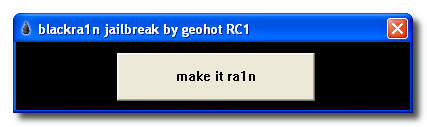
3.) Locate the downloaded file “Blackra1n” and double-click on it. Click on "Make it ra1n" to launch the tool.


4.) Your iPhone will now enter into Recovery Mode. If iTunes opens, simply close it.


5.) After the reboot, Blackra1n will indicate that your iPhone has been jailbroken. Click “OK”. You can also close Blackra1n now if it is still open.

6.) Once at your iPhone home-screen, go to Settings > WiFi and turn on WiFi.

7.) On your iPhone home-screen, you will see a new Blackra1n icon. Tap on it.


8.) When Blackra1n opens, tap on Cydia (or Rock) and tap “Install” in the top right corner.

9.) Cydia (or Rock) will now be visible on your iPhone home-screen. Your iPhone is now Jailbroken.

How to Unlock the iPhone 3G/3GS

1.) On your iPhone home-screen, tap on the Blackra1n icon.

2.) In the Blackra1n app, tap on “Sn0w”. Your iPhone will now be unlocked.


Note: You may go back into the Blackra1n app on your home-screen and use the Uninstall toggle to remove the Blackra1n app from your home-screen. This does not affect the jailbreak or unlock.


---------------------------------------------------------------------------------


The following is how to Unlock the iPhone 3G/3GS if you are already Jailbroken and running Baseband 05.11.07

1.) On your iPhone home-screen, tap on the Cydia icon.

2.) If Cydia prompts you for updates, install them all.

3.) In Cydia, tap on the “Manage” tab at the bottom.


4.) Tap on the “Sources” button.

5.) Tap on the “Edit” button in the top right corner of the screen and then tap the “Add” button in the top left corner.

6.) Type in http://www.blackra1n.com and then tap “Add Source“.


7.) Now tap on the “Done” button in the top right corner of the screen.

8.) Tap on “blackra1n” from the “Sources” List under the “Manage” tab.


9.) Select “blacksn0w” from the list of packages and then tap “Install” in the top right corner of the screen and then tap “Confirm“.


10.) After the unlock is installed, tap on “Return to Cydia“. Your iPhone is now unlocked.


--------------------------------------------------------------------------------------


The following is how to Jailbreak and Unlock the iPhone 2G on 3.1.2 Firmware

1.) Plug your iPhone into iTunes, do a backup and then click “Update” to install firmware 3.1.2. After the update, eject your iPhone from iTunes using the “eject” button and close iTunes. Leave your iPhone connected to your computer.

2.) Click on the appropriate link for PC or MAC and download Blackra1n. Save the file to your computer desktop.


3.) Locate the downloaded file “Blackra1n” and double-click on it. Then click on the "Make it Ra1n" button.


4.) Your iPhone will now enter into Recovery Mode. If iTunes opens, simply close it.


5.) After the reboot, Blackra1n will indicate that your iPhone has been jailbroken. Click “OK”. You can also close Blackra1n now if it is still open.

6.) Once at your iPhone home-screen, go to Settings > WiFi and turn on WiFi.

7.) On your iPhone home-screen, you will see a new Blackra1n icon. Tap on it.


8.) When Blackra1n opens, tap on Cydia (or Rock) and tap “Install” in the top right corner.

9.) Cydia (or Rock) will now be visible on your iPhone home-screen. Your iPhone is now Jailbroken.

How to Unlock the iPhone 2G

1.) On your iPhone home-screen, tap on the Blackra1n icon.

2.) In the Blackra1n app, tap on “Cydia” to install Cydia. (If you already installed Cydia, move to Step 3)


3.) Cydia will prompt you for updates. Tap on “Complete Upgrade” and install them all.

4.) In Cydia, search for the app “BootNeuter” and install the app.

5.) Open BootNeuter and make sure the settings match the image below:


6.) When the settings match the above image, tap on “Flash” in the top right corner. The iPhone 2G will now be unlocked.


Note: You may go back into the Blackra1n app on your home-screen and use the Uninstall toggle to remove the Blackra1n app from your home-screen. This does not affect the jailbreak or unlock.


--------------------------------------------------------------------------------------


The following is how to Jailbreak the iPod Touch on 3.1.2 Firmware


1.) Plug your iPod Touch into iTunes, do a backup and then click “Update” to install firmware 3.1.2. After the update, eject your iPod Touch from iTunes using the “eject” button and close iTunes. Leave your iPod Touch connected to your computer.

2.) Click on the appropriate link for PC or MAC and download Blackra1n. Save the file to your computer desktop.

3.) Locate the downloaded file “Blackra1n” and double-click on it. Click on the "Make it Ra1n" button.


4.) Your iPod Touch will now enter into Recovery Mode. If iTunes opens, simply close it.


5.) After the reboot, Blackra1n will indicate the your iPod Touch has been jailbroken. Click “OK”. You can also close Blackra1n now if it is still open.

6.) Once at your iPod Touch home-screen, go to Settings > WiFi and turn on WiFi.

7.) On your iPod Touch home-screen, you will see a new Blackra1n icon. Tap on it.


8.) When Blackra1n opens, tap on Cydia (or Rock) and tap “Install” in the top right corner.

9.) Cydia (or Rock) will now be visible on your iPod Touch home-screen. Your iPhone is now Jailbroken.

Note: You may go back into the Blackra1n app on your home-screen and use the Uninstall toggle to remove the Blackra1n app from your home-screen. This does not affect the jailbreak.

--------------------------------------------------------------------------------------

The following is how to Revert Your iPhone 2G/3G/3GS or iPod Touch Back To “Normal”

1.) Open iTunes and plug your iPhone 2G/3G/3GS or iPod Touch in via the USB. Backup your iPhone/iPod Touch if iTunes allows you to.


2.) When iTunes recognizes the iPhone/iPod Touch, click on the “Restore” button in iTunes. This will restore your iPhone/iPod Touch with fresh 3.1.2 firmware.

3.) After the restore is complete, iTunes will prompt you to Set up a New Device or Restore from Back Up from an existing backup (the backup from step 1). Choose which ever method you want and let iTunes process.

4.) After the processing is complete, your iPhone/iPod Touch will be loaded with the fresh 3.1.2 firmware or loaded with your back up that you may have chosen.

5.) Eject the iPhone/iPod Touch from iTunes using the “eject” button and disconnect the USB cable from the iPhone/iPod Touch. Turn the iPhone/iPod Touch off and then turn the iPhone/iPod Touch back on.


Use Bonus Code: TGiPJB for 100% up to $100 on 1st Deposit

Apple battles 'jailbreakers' over iPhone control

By Brian X. Chen, Wired


When he was 17, George Hotz (creator of blackra1n) poured hundreds of hours of his summer vacation into a special project: learning the iPhone's secrets. His unpaid labor eventually paid off.

With the help of a soldering iron, he was the first to unlock the iPhone, delivering the handset to international networks before Apple had a chance to.

He got some perks, too. His unlock catapulted him to internet stardom, catching the eye of an entrepreneur who traded his Nissan 350Z car for Hotz's restriction-free iPhone.

Hotz, now 20, makes a living as a "hacker for hire" of sorts -- getting paid to break into different types of gadgets. He gets to spend his free time unofficially attending a college, where he pretends to be a student just to socialize.

What's best, Hotz didn't think unlocking the iPhone was even hard.

"It did take 500 hours, but thinking back to some of the stuff I've done now, the first iPhone was incredibly easy," Hotz said in a phone interview.

But what was an easy task for a curious teen has turned into a persistent headache for Apple, one that the company has been trying to cure for over two years, with little success.

With each new version of the iPhone operating system, a small army of independent programmers and hackers get to work prying it open, removing restrictions and making their iPhones do things that Apple CEO Steve Jobs never intended.

To stay faithful to agreements with telecom partners, Jobs in September 2007 declared Apple was playing a "cat-and-mouse game" to disable unlocked iPhones. Apple regularly issues software updates to disable hacked, unlocked versions of the handset. But within a few weeks, new hacks emerge, freeing the iPhone from carrier restrictions again.

In fact, Hotz just last month released the easiest hacking solution for the iPhone to date.

Named "Blackra1n," his software can hack and unlock an iPhone in just two minutes. All the user needs to do is plug in an iPhone, launch the application and click a button.

It's safe to say this is a game where the mouse has outrun the cat, and it's unlikely Apple will catch up anytime soon. That's because Apple is up against a lot more than an individual hacker.

The iPhone and its App Store not only gave birth to a new digital frontier for mobile software, but created an entire underground ecosystem: the Jailbreak community.

In addition to multiple iPhone hacker groups pumping out different unlocking solutions on a regular basis, there are several stores hosting unauthorized iPhone apps and programmers developing software strictly for hacked iPhones.

Hackers adopted the word "jailbreak" to describe the act of overriding the iPhone's restrictions to install unauthorized software in the device. Jailbreaking is the first step an iPhone owner must take in order to later execute the hack to unlock the handset, enabling it to work with any carrier.

The original iPhone was extremely insecure and thus very easy to jailbreak, according to Hotz, and hackers almost immediately broke into the gadget after it debuted in June 2007.

Jailbreaking accelerated quickly. Soon, hackers reverse-engineered major parts of the iPhone API, and they opened doors to creating and installing third-party apps for the device.

Games, utilities and even custom themes and wallpapers enhanced the capabilities of the handset. To Apple enthusiasts, this was exciting: The iPhone at the time had no App Store, so jailbreaking was the only way to get more than the handful of basic apps provided by Apple.

In August 2007, Hotz announced he had unlocked the iPhone with the Dev Team, a group of hackers that posts jailbreak tools and instructions. Soon after, Hotz released software that anyone in the world could use to make their iPhone work with any carrier's SIM card.

When Apple in July 2008 opened its official App Store, the urge to jailbreak got less exciting. The App Store grew quickly -- with 100,000 apps to date -- making the act of jailbreaking seemingly irrelevant to the average iPhone owner, who could download Apple-sanctioned apps without risk.

Reformation

But the App Store didn't stop the Jailbreak community from proliferating. Now that the App Store exists, jailbreakers have shifted their focus to creating work-arounds for the iPhone's many restrictions. Most share an open-software philosophy, giving consumers full ownership rights over their product, or the ability to do whatever they wish with the gadget they paid for.

Jay Freeman owns Cydia, an unauthorized app store open to jailbroken iPhones, which distributes iPhone apps Apple would otherwise forbid. Before opening his store, Freeman played an instrumental role in setting up the early groundwork for the jailbreak platform.

Often referred to as "Saurik" in the Jailbreak community, Freeman admitted he was initially reluctant about the iPhone due to its stifling limitations.

"Apple seems to have spent very little time looking at previous phones, and left out many features that users, such as myself, have come to expect," said Freeman, reflecting on the original iPhone. "However, [a friend] insisted to me that jailbreaking was the future. The software it comes with doesn't matter; I can just rewrite it all to my liking."

The need for an underground app store became more clear after Apple rejected several iPhone apps. The company faced severe scrutiny when it rejected the official Google Voice app, which would enable consumers to use a single phone number to ring all their phones, send free text messages and make cheap international calls.

The move stirred so much controversy that even the Federal Communications Commission investigated the rejection.

Unauthorized app stores served as a way of circumventing Apple's censorship. And some programmers are even making money coding forbidden iPhone apps.

"People are so annoyed by Apple and their shit, and if you give them opportunity to go around it, then they'll even pay for it," said Kim Streich, a developer whose app 3G Unrestrictor earned $19,000 in sales in just two weeks through Cydia.

With more than 10 million jailbroken iPhones registered, Freeman's Cydia store is the most popular underground app store. Icy and Installer, two previous unauthorized iPhone software distributors, have been discontinued.

Whenever Apple releases an iPhone update, the new software usually erases unauthorized apps and disables unlocked iPhones. In response, the iPhone hacker group Dev Team continues to post regular updates on its blog with instructions and new jailbreak patches for newer iPhone software. The Dev Team's main jailbreak weapon is called Pwnage Tool, which creates a custom (hacked) patch for Apple's iPhone firmware and then installs it on the device.

To further combat jailbreaks, Apple has attempted to claim to the U.S. Copyright Office that jailbreaking is illegal.

However, the Dev Team skirts around copyright issues by not copying and providing Apple's software, according to Eric McDonald, a member of the Dev Team. Instead, the Pwnage Tool requires iPhone users to download Apple's legitimate firmware, and the Pwnage Tool patches it with jailbreak code.

Hotz, who was kicked out of the Dev Team after prematurely publishing information on iPhone hacks, still hacks away the iPhone on his own. Hotz doesn't demand money for his work, though he does accept donations.

He isn't shy about showing his face to Apple or the world, either: When running Blackra1n, the iPhone temporarily displays a photo of Hotz styled as an angel from a Caravaggio painting (above).

"Blackra1n is only 600K, and 200k of it is my picture," Hotz said, laughing.

Though the Jailbreak community persistently issues new hacks for iPhone updates, Apple is continuing to fight. A recent Apple job listing reveals the company is seeking an iPhone OS security manager to help prevent exploits, which could block future jailbreak solutions.

Hotz doubted a security expert could block his efforts. In fact, he said he's already discovered a brand new exploit that will jailbreak and unlock Apple's fourth-generation iPhone -- presumably due in stores summer of 2010 -- even though he hasn't touched it.

"Personally I love that Apple keeps the iPhone closed," Hotz said. "This is a personal hobby; it'd be no fun if Apple didn't have it closed anymore. Get a Jailbreak cop and then I'll show them what I can really do."


Use Bonus Code: TGiPJB for 100% up to $100 on 1st Deposit

blackra1n

blackra1n is an unlock / jailbreaking tool for Mac and PC users alike. This is not a dev-team release but some users are reporting success with this new tool. For more information about blackra1n the link has been added in the trusted link section on the right, or you can follow the links below:

Click here for PC users

Click here for MAC users


Use Bonus Code: TGiPJB for 100% up to $100 on 1st Deposit

Tuesday, November 10, 2009

redsn0w in june (From the iPhone dev-team)

Read the whole post in full before attempting anything!

redsn0w is an easy to use, multi-platform, multi-device jailbreaking and unlocking tool for the iPhone 2G (original iPhone), the iPhone 3G/3GS and also the iPod touch (first and second generation). It is available for Linux, Mac OS X and Windows.

REDSN0W PROVIDES SIMILAR FUNCTIONALITY TO QUICKPWN.

If you want to build custom firmware files with more flexibility it is suggested that you use ‘PwnageTool’ on Mac OS X.

1. UltraSn0w has been released via APT (cydia and icy), you can use that to unlock your iPhone.
2. Yellowsn0w has been replaced with Ultrasn0w which has been released via APT (this means you will be able to get it via Cydia or Icy).
3. Please read all parts of this post before downloading and using these tools.
4. Read items 1, 2 and 3 again and again.
5. At the bottom of this post are the bittorrent files for the latest version of redsn0w.
6. This app is suitable for the 3.0 release
7. redsn0w WILL work for all iPhones (the original type), Original iPod touch, iPod touch 2G and the iPhone 3G (and the iPhone 3GS).
To use redsn0w simply upgrade the device in iTunes to firmware version 3.0 and run redsn0w to activate and jailbreak the device (and if you are using an original iPhone 2G, it will unlock it too!)

SHA1 SUMS

SHA1(redsn0w-mac_0.8.zip)=
SHA1(redsn0w-win_0.8.zip)=
SHA1(redsn0w-linux_0.8.zip)=

Official Bittorrent Releases -

Mac torrent
Windows torrent
Linux torrent

Unofficial Mirrors

The following links are unofficial download mirrors, you download these at your own risk, we accept no responsibility if your computer explodes or if it becomes part of a NASA attacking botnet or even worse if your hands fall off mid-way during the use of these files. We do not check these links or archives and we accept no responsibility with regard to the validity of the files, or with other content these links provide or with the content that is on the linked site. Always check the published SHA1 sums. We would prefer that you downloaded the official bittorrent release that is linked above, but you are welcome to try these if you really must. Mirror owners should email direct links only to blog@iphone-dev.org , please don’t place mirrors in the comments as they will be deleted.

Mac

Windows

Linux


Use Bonus Code: TGiPJB for 100% up to $100 on 1st Deposit

Tuesday, August 25, 2009

Recycling goodness


From the iPhone Dev Team:


Short version:

You can re-use redsn0w v0.8 we released a few weeks ago to jailbreak today’s 3.0.1 update. Just let iTunes update or restore you to official 3.0.1 then run redsn0w. The only “trick” is that when redsn0w asks you to identify the IPSW used, point it at the 3.0 IPSW instead of the 3.0.1 one. After the jailbreak, reinstall ultrasn0w 0.9 if you need the unlock.

More details:

The 3.0.1 release is a “branch” from 3.0 that occurs (code-wise) before all the 3.1 betas. The programs redsn0w needs to change for the jailbreak are identical when you compare the 3.0 and 3.0.1 versions. It seems pretty much the only changes Apple made were for the SMS bug, which affects programs that redsn0w doesn’t touch. That’s why you can re-use redsn0w 0.8 on 3.0.1 even though it was written for 3.0.

And since 3.0.1 doesn’t touch the baseband either, ultrasn0w 0.9 works for those needing the soft unlock. Just install it from the repo666.ultrasn0w.com repository using Cydia as usual.

We’ll at some point fix redsn0w to recognize both 3.0 and 3.0.1 IPSW’s, but really that’s the only change that would be made to it. Everything else would be identical, so there’s no need to wait for the “proper” version that recognizes the 3.0.1 IPSW as valid.


Use Bonus Code: TGiPJB for 100% up to $100 on 1st Deposit

Friday, July 31, 2009

Jailbreak 3.0 with RedSn0w!

From the iPhone Dev Team

Read the whole post in full before attempting anything!

redsn0w is an easy to use, multi-platform, multi-device jailbreaking and unlocking (iPhone 2G only) tool for the iPhone 2G (original iPhone), the iPhone 3G (but not the 3GS) and also the iPod touch (first and second generation). Currently it is available for Windows and Mac OS X (there are some issues using redsn0w with OS X PPC, please use an Intel Mac until we have this problem resolved).

REDSN0W PROVIDES SIMILAR FUNCTIONALITY TO QUICKPWN.

If you want to build custom firmware files with more flexibility it is suggested that you use ‘PwnageTool’ on Mac OS X.

GOLDEN RULE: If you are using a 3G iPhone with yellowsn0w and rely on yellowsn0w to obtain cellular service, then you should NOT use redsn0w right now. Ultrasn0w (the 3G carrier unlock) is not included with this release and therefore your baseband will be locked and unable to use an operator other than the official one it was bought for. UltraSn0w will be released via APT (cydia and icy) soon. If you have an original iPhone (1st generation) then 3.0 carrier unlock works with this redsn0w release.
Yellowsn0w in its current form will NOT work with the baseband version that is present in the 3.0 update, you will need Ultrasn0w, which will be released sometime soon, Ultrasn0w will work with all iPhone 3G models (but not 3GS), even ones that were previously unlockable, Ultrasn0w (when available) will be released via APT (this means you will be able to get it via Cydia or Icy).
Please read all parts of this post before downloading and using these tools.
Read items 1, 2 and 3 again and again.
At the bottom of this post are the bittorrent files for the latest version of redsn0w.
This app is suitable for the recent 3.0 release
redsn0w will NOT work for the iPhone 3GS.
redsn0w WILL work for Original iPhone (1st Generation), Original iPod touch, iPod touch 2G and the iPhone 3G (not the iPhone 3GS).
To use redsn0w simply upgrade the device in iTunes to firmware version 3.0 and run redsn0w to activate and jailbreak the device (and if you are using an original iPhone 2G, it will unlock it too!)

SHA1 SUMS

SHA1(redsn0w-mac_0.7.2.zip)=0d58ff133461f3487a80200fe924741dd393b724
SHA1(redsn0w-win_0.7.2.zip)=444a3120b6bfd98838df74d598d3799cf656dfff

Official Bittorrent Releases -

Mac torrent
Windows torrent

Unofficial Mirrors

The following links are unofficial download mirrors, you download these at your own risk, we accept no responsibility if your computer explodes or if it becomes part of a NASA attacking botnet or even worse if your hands fall off mid-way during the use of these files. We do not check these links or archives and we accept no responsibility with regard to the validity of the files, or with other content these links provide or with the content that is on the linked site. Always check the published SHA1 sums. We would prefer that you downloaded the official bittorrent release that is linked above, but you are welcome to try these if you really must. Mirror owners should email direct links only to blog@iphone-dev.org , please don’t place mirrors in the comments as they will be deleted.

Mac

http://bentkowski.com.pl/redsn0w-mac_0.7.2.zip
http://foskarulla.com/redsn0w-mac_0.7.2.zip
http://download.desteini.com/mac/redsn0w-mac_0.7.2.zip
http://theiphoneproject.org/mac/redsn0w-mac_0.7.2.zip
http://begolli.com/downloads/mac/redsn0w-mac_0.7.2.zip
http://www.highphone.org/redsn0w-mac_0.7.2.zip
http://iwannahack.com/extra/Evilbenking/redsn0w/redsn0w-mac_0.7.2.zip
http://iphone.awayfrombrain.ch/pwnage/redsn0w-mac_0.7.2.zip
http://www.ipodtouchmasterfr.com/files/redsn0w-mac_0.7.2.zip
http://StealthyHosting.com/download/redsn0w-mac_0.7.2.zip
http://ivwriting.com/redsn0w-mac_0.7.2.zip
http://asifzia.com/redsn0w-mac_0.7.2.zip

Windows

http://theiphoneproject.org/windows/redsn0w-win_0.7.2.zip
http://begolli.com/downloads/win/redsn0w-win_0.7.2.zip
http://www.highphone.org/redsn0w-win_0.7.2.zip
http://iwannahack.com/extra/Evilbenking/redsn0w/redsn0w-win_0.7.2.zip
http://iphone.awayfrombrain.ch/pwnage/redsn0w-win_0.7.2.zip
http://www.ipodtouchmasterfr.com/files/redsn0w-win_0.7.2.zip
http://StealthyHosting.com/download/redsn0w-win_0.7.2.zip
http://ivwriting.com/redsn0w-win_0.7.2.zip
http://asifzia.com/redsn0w-win_0.7.2.zip


Use Bonus Code: TGiPJB for 100% up to $100 on 1st Deposit

Tuesday, June 9, 2009

New iPhone 3G S and 3.0 OS Upgrade Announced!

This afternoon, Apple announced the launch of a new iPhone 3G S device. Additionally, they advised current customers will be able to upgrade to the new 3.0 Operating System (OS) version via a computer on June 17.

What will the iPhone OS 3.0 Feature?

The most advanced mobile operating system. Now even more advanced.
iPhone OS 3.0 represents a major software release, bringing cut, copy, and paste, Spotlight search, MMS, and more to the iPhone.


What you need to know now about 3.0:

Worldwide availability through iTunes as a free update. Requires the latest version of iTunes (update available at product release)


Additional Features

Cut, copy, and paste text, graphics, and information from nearly every application.
Tap and hold or double-tap to access cut, copy, and paste options:
Select: Drag grab points to select the text or content to copy, or tap Select All to choose everything.

Cut or Copy: Select text, image, or desired area.
Paste: Tap where you want to insert content, and then tap paste.
Shake iPhone to undo or redo changes.


Support for stereo Bluetooth accessories (A2DP-compatible). Some features and services may not be available in all areas. MMS messaging is available only on iPhone 3G, and may not be available immediately at release. Check your wireless carrier for pricing and availability.

Troubleshooting Update and Restore Issues

To update to iPhone OS 3.0:


Connect iPhone to the computer via USB open iTunes and select the iPhone. On the iPhone Summary tab select "Update"

iPhone OS 3.0 requires the latest version of iTunes, available at product release.

Download and install the latest version of iTunes using one of the following methods:

iTunes Product Page: www.apple.com/itunes/downloads
iTunes for Mac: Choose "Check for Updates" from the iTunes menu
iTunes for Windows: Choose "Check for Updates" from the Help menu

If you encounter an error while downloading or installing the iPhone OS 3.0 update, try the following:

Verify system requirements:

Latest version of iTunes
USB 2.0 port
An active Internet connection
Mac OS X 10.4.10 (or later) or Windows XP Home or Professional (SP2) or Windows Vista

Check for security software that affects Internet connectivity, including firewall and virus-protection software. Restart the computer and iPhone, or try updating using a different computer.

Stay iTuned for more!!!


Use Bonus Code: TGiPJB for 100% up to $100 on 1st Deposit

Wednesday, June 3, 2009

That tempting "update" button

From the iPhone Dev-Team:

Yesterday, Apple started pushing out their official iTunes 8.2, which supports mobile devices at firmware 3.0. Here’s why you jailbreakers and yellowsn0w-users shouldn’t really accept that “Update now?” question:

Most people aren’t at 3.0. In fact 3.0 is still in beta and has lots of bugs (especially related to push updates).
It breaks your ability to use QuickPwn, PwnageTool, and iPhone Tunneling Suite (ssh over usb). We don’t think this is a deliberate breakage of these tools. It’s just that Apple has updated a low-level USB protocol that normally only Apple cares about (but jailbreakers care about).
So far, the only appreciable change to iTunes 8.2 is the Genius function working on videos.
It may actually break Palm Pre’s connection to the device (please give us feedback on this).
This update is one of those that incidentally breaks QuickPwn and PwnageTool. It doesn’t seem like an anti-jailbreak. But nonetheless, it will break your ability to re-run QuickPwn or PwnageTool’s dfu-entry.

Because this update isn’t a deliberate anti-jailbreak measure, it’s easily fixed in our tools. But we really don’t want to update our tools until 3.0 is out, so please don’t update to 8.2 if you think you’ll need to rejailbreak your device. :)

YellowSn0w on 2.2.1 and beyond

We see many questions about whether yellowsn0w can ever be made to work on firmware versions past 2.2 (or equivalently, basebands past 02.28). This is probably a good place to address those questions:

If there is a yellowsn0w update for firmware after 2.2 (or basebands after 02.28), there is no way it would ever be released before 3.0 is official. It just wouldn’t make any sense to release an exploit for something that only those who have beta 3.0’s (NDA signers) could use. Most people in the world aren’t NDA signers. Any yellowsn0w update for 3.0 would need to happen *after* 3.0 is officially available.


Use Bonus Code: TGiPJB for 100% up to $100 on 1st Deposit

Thursday, May 21, 2009

Using WinSCP

I've had some inquiries about using WinSCP and how to troubleshoot some scenarios. For that I'm going to leave you this link for the WinSCP User Guide. It came in handy when I first used it! Good Luck!!


Use Bonus Code: TGiPJB for 100% up to $100 on 1st Deposit

Wednesday, May 20, 2009

Half way home? (from the iPhone Dev-Team)

Apple just released the fifth beta of their 3.0 OS. Back when 2.0 was still in beta, they released about nine beta firmwares, so it’s reasonable to assume we’re about half way through the 3.0 beta process.

As should be expected, the modern devteam jailbreak process is still valid. The picture below is 3.0beta5 jailbroken on an iPhone 3G. As we’ve said in previous posts, nothing other than a hardware respin can prevent our jailbreak from working on all exisiting iPhone and iPod Touches. They’ve chased our jailbreak so far down in the chain of trust, the only way they can fix it is in hardware.


Because there are so many beta releases, we couldn’t possible refine, test, and release both PwnageTool and QuickPwn for each of them. That’s why we’re waiting until the final release. You may have seen other “hijacked” versions of QuickPwn out there, but all of them are buggy, none of them work on OSX, and almost everyone who uses them reverts back to 2.2.1 (because none of the useful jailbroken apps (Qik, Cycorder, and others) work on 3.0 yet).

But this is a good time to remind everyone. If you care about the yellowsn0w unlock, don’t go anywhere near the beta releases. You will lose your unlock, possibly forever.

Stay iTuned for more on 3.0!!


Use Bonus Code: TGiPJB for 100% up to $100 on 1st Deposit